
The problem was twenty people, one new tool and no appetite for a two-hour meeting
At work, I was asked to train 20 new team members on how to use our AI tools. They were new to the workflow, the interface was unfamiliar, and the useful part was not a list of features. They needed to see one realistic task move from question to safe automation.
I could have made a deck and scheduled a long call. Instead, I looked at the pipeline I had built for anime music videos. That system already knew how to turn a brief into scenes, voices, timing, motion, review notes and a final render. The subject was ridiculous. The production grammar was useful.
Could I replace space battles with software training and let the new GPT model run the night shift?
The experiment became a three-minute tutorial for first-time Microsoft Copilot Cowork users. Patrick plays the dangerously confident student. Su keeps the lesson accurate. Together they show how to review fictional committee email, inspect the evidence, schedule a private draft and manage the automation without surrendering control.
I set the goal, the safety boundaries and the approval gates. GPT-6 handled the production chain: research, script passes, critic passes, interface choreography, voice direction, corrections and render preparation. The result was not an unsupervised publishing robot. It was a reviewable training artifact waiting for me in the morning.
Watch the result
The finished Cowork training demo
The interface and email are staged with fictional data. The video uses burned-in captions, GPT Live character voices and a local HyperFrames composition.
The actual build was a chain of reusable files, not one giant prompt
I gave GPT-6 a production job with named outputs. Each stage had to leave behind something the next stage could inspect and reuse:
- Brief and researchLock the beginner outcome, fictional-data rules, current product terminology and 9/10 critic gate.
- Script and performance manifestWrite each line, assign Patrick or Su, add emotional direction and record the exact accepted transcript.
- Character asset manifestGenerate escalating reaction sheets, split them into transparent overlays and name every pose so the timeline can select it.
- Deterministic product scenesBuild a local Cowork-like app whose fictional data, states and control positions can be reproduced on command.
- HyperFrames compositionPlace screen captures, voices, sprites, captions, cursor moves and VFX on one seekable 1920×1080 timeline.
- Checks and renderInspect exact frames, contrast, collisions, audio levels and transitions before creating the MP4.
The model could work stage by stage because the handoff was concrete: JSON, WAV, PNG, HTML, captured geometry and timing data. If something failed, I could repair that layer without restarting the whole production.
GPT Live did its own two-character voice acting
This was not ordinary text-to-speech pasted onto a timeline. I opened two persistent GPT Live sessions using gpt-live-1: Patrick used the male meridian voice and Su used the female gleam voice. Each session received a character brief that stayed active for the scene. Patrick was warm, cocky and sincerely impressed with himself. Su was clever, relaxed and affectionate when correcting him.
Every line had three fields: the exact words, the speaker and acting direction. A direction could ask Patrick to accelerate as his idea became more ridiculous, or ask Su to pause after “Weekly” and let the correction sparkle without sounding annoyed.
Patrick / meridian → performs line 1
        ↓ generated PCM becomes Su's input
Su / gleam → hears Patrick, then performs line 2
        ↓ generated PCM becomes Patrick's input
Patrick → reacts to Su, then performs line 3
The wrapper listened for streamed audio and transcript events, trimmed the silence, wrote a WAV for every line and compared the returned transcript with the locked script. The final manifest records the speaker, voice, emotional direction, duration and exact-word-match result. The tutorial uses 25 accepted takes. When the product flow changed, I kept 23 performances and rerecorded only the two lines that named the corrected schedule and Automations steps.
Finally, the WAV files were compression-assisted, loudness-normalized and assembled into one synchronized dialogue stem. The API key stayed in a local environment file and was never placed in the browser or the finished video.
I generated a reaction library, then turned the sheets into addressable sprites
I did not ask the image model for “a funny Patrick” every time a joke appeared. I designed a reusable escalation ladder for both characters. Patrick moves from cocky energy to being caught wrong, comedy panic, comic catastrophe and maximum ridiculous. Su moves from patient corrections to affectionate teasing, adorable exasperation, supernatural correction and full correction-goddess mode.
That produced ten high-resolution 2×2 sheets—five for Patrick and five for Su—with four poses per sheet. A post-processing script detected the quiet transparent gutters, split each sheet into four cells, removed stray pixels at the internal edges, cropped to the visible alpha bounds and added transparent padding. It then created 40 individually named PNG overlays, two 4×5 catalogs and a JSON manifest mapping character, comedy level, sheet and pose.
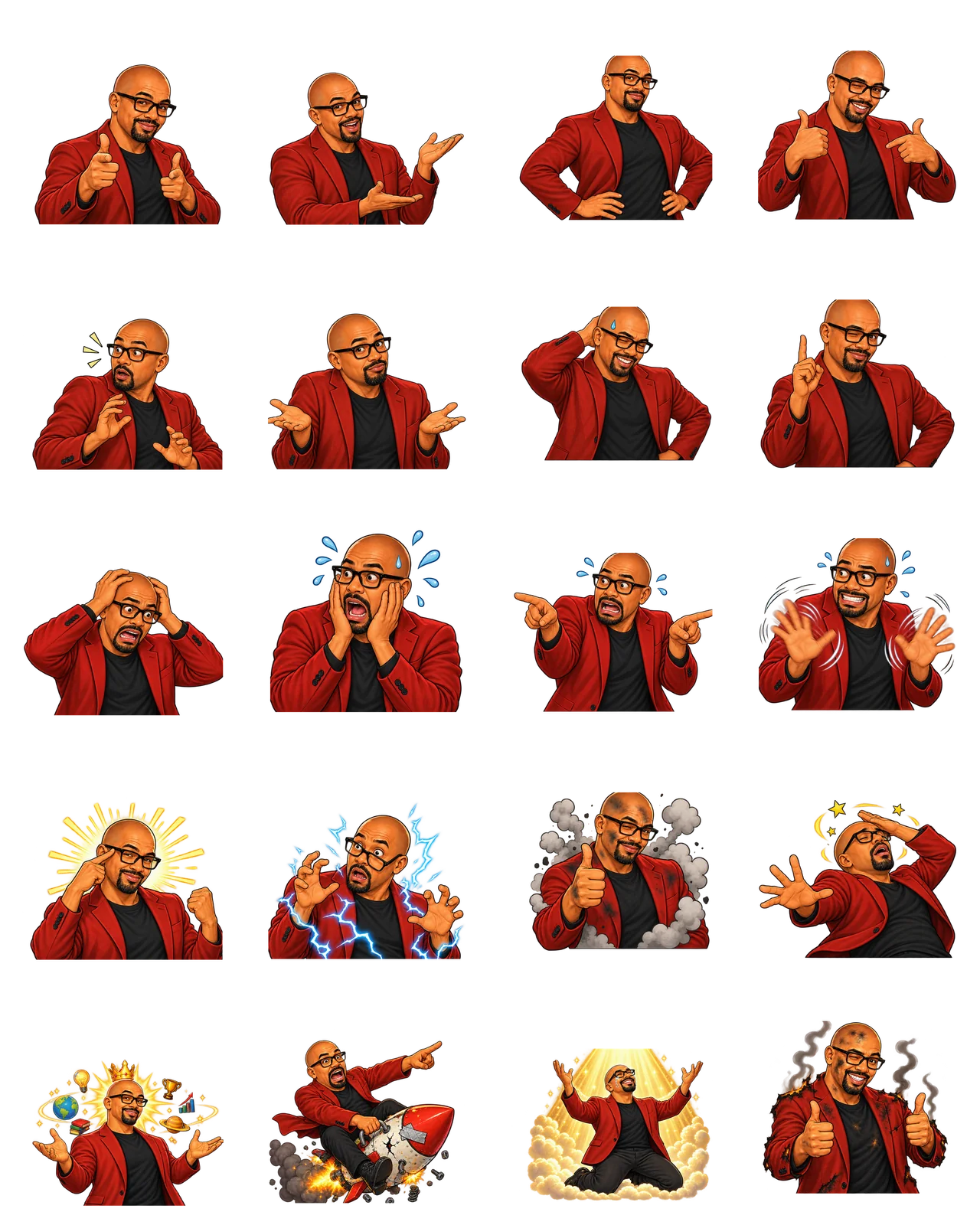
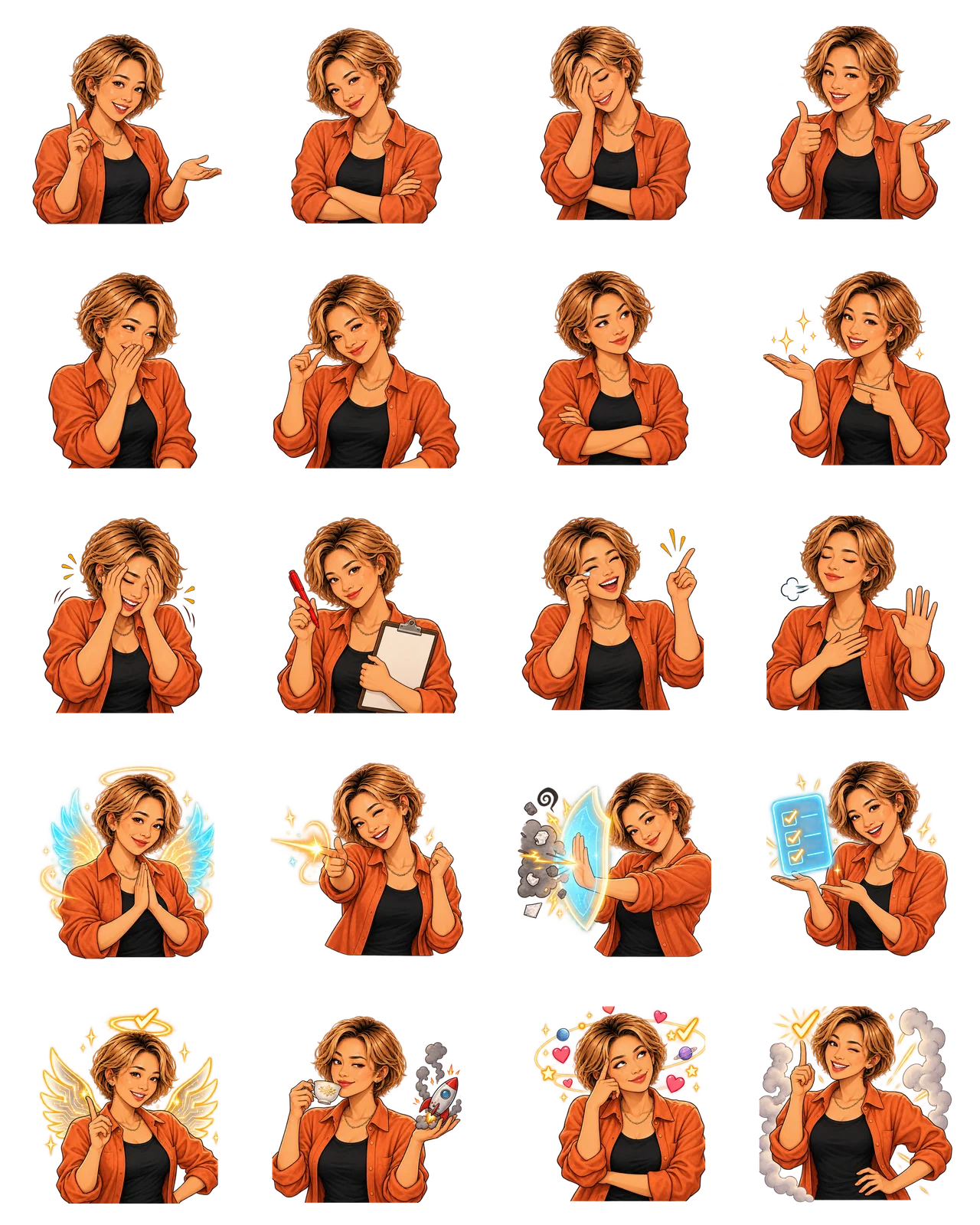
HyperFrames could now request a useful file such as patrick-01-01-finger-guns.png or su-03-02-correction-clipboard.png instead of regenerating art. Normal dialogue used levels one and two. Mistake reveals could use level three. Levels four and five were reserved for transitions and punchlines so the comedy still had somewhere to go.
I mocked Cowork as a deterministic little app with fictional email
Recording the real product would have created three problems: sensitive mailbox data, product states that could change between takes, and highlights that would drift when the interface moved. So I built a standalone HTML, CSS and JavaScript training mock. It resembles the documented Cowork flow but is not connected to Microsoft 365, never reads a mailbox and never sends anything.
All sample people, committee messages, dates, tasks and schedules live in one editable data file. The scenario contains three fictional weekly AI Committee follow-up threads. The mock “finds” the repeated need to collect decisions, owners, due dates and open questions, then recommends a private Monday 8:30 A.M. digest draft.
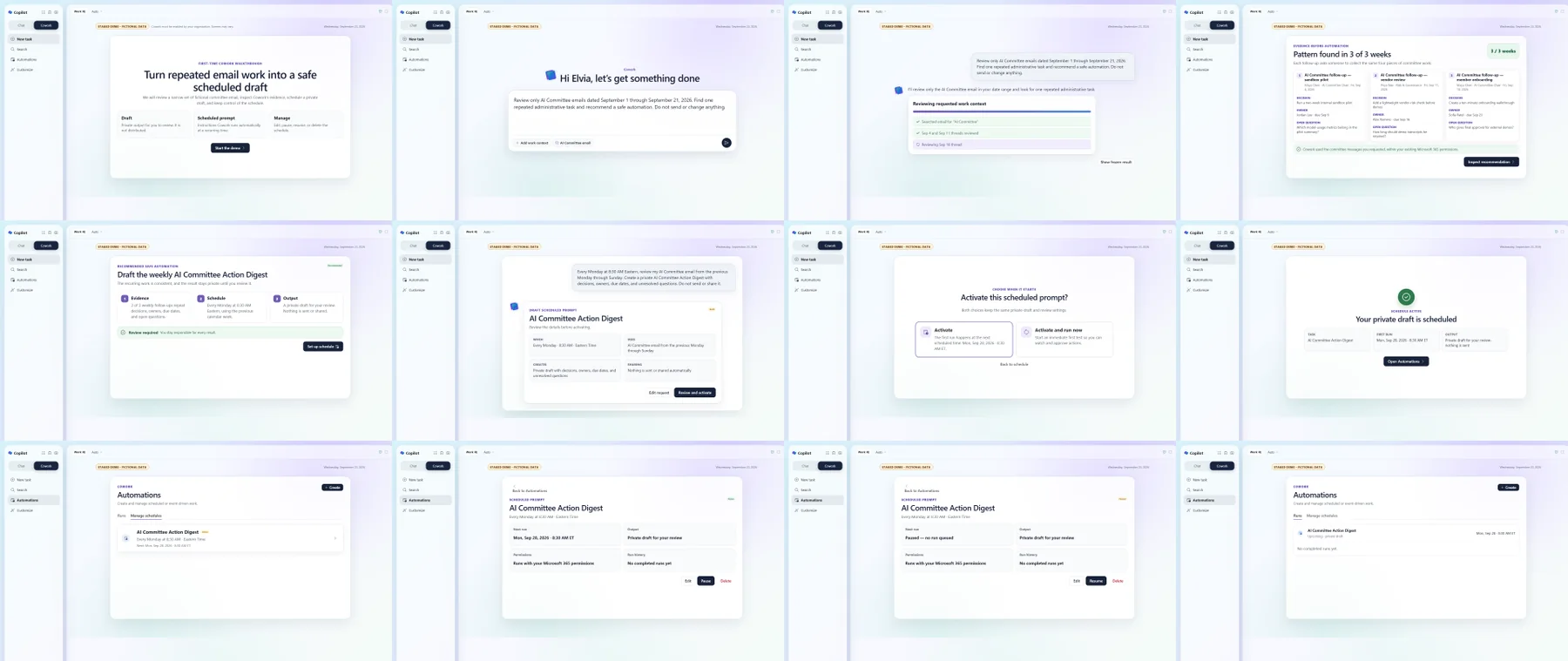
Each screen has a deterministic URL such as ?scene=committee-evidence or ?scene=committee-paused. A small authoring panel can change the name, prompt, model and side panel. A scripting API can stage scenes, start a simulated task and pause or resume the fictional schedule. That made it easy for GPT-6 to fill the app with safe sample data and reproduce the same shot during every review pass.
Every clickable tutorial control also exposes a named data-demo-target. The capture script asks CoworkDemo.getTargetRects() for the live DOM rectangles and saves their centers beside the screenshots. HyperFrames uses those measurements for the mouse path, focus box and click ripple. The pointer therefore targets the control shown in the captured image instead of relying on guessed coordinates.
This system also made correction cheap. When research showed that current Cowork scheduling is conversational, I removed the invented multi-field form, staged a natural-language schedule request and added the documented draft review plus Activate and Activate and run now choices.
HeyGen HyperFrames turned those assets into a deterministic video
HyperFrames is HeyGen’s open-source, agent-oriented HTML-to-video framework. Instead of dragging everything around a traditional editing timeline, the video is an editable HTML composition. Normal HTML and CSS control the look; timing attributes and seekable animation code say exactly when each element appears and where it moves.
For this project it ran locally. It was not a hosted HeyGen avatar generation. HyperFrames Studio gave me a browser preview of the composition, its checks inspected exact frames, and the local renderer asked Chrome for each deterministic frame before FFmpeg encoded the MP4. A slow preview therefore does not decide which moments survive in the final output.
I split the tutorial into six scene groups, nine character groups and four caption-track groups. The composition layered the captured Cowork screens, the normalized dialogue stem, Patrick and Su PNGs, burned-in word-highlight captions, a simulated mouse, click ripples, focus zooms, spotlight cards, restrained confetti and whip-pan transitions. The timing map aligned all of them to the measured voice takes.
The final local render was 1920×1080 at 30 fps: 5,272 H.264 frames with AAC audio. HyperFrames’ strict checks finished with zero lint, runtime, layout, motion or contrast failures before the delivery render.
Lower model cost let the pipeline spend more intelligence on correction
The useful change was not simply that GPT-6 could produce a stronger first draft. Its lower run cost made repeated, specialized passes practical. One pass researched current product language. Another criticized the script. Another compared highlights with captured geometry. Another inspected scene collisions. Another rebuilt the two voice lines affected by the product correction.
That matters because training content fails in small places. A highlight surrounds the wrong control. The script names a button that moved. A joke covers the click. A confident animation implies that an automated task can send something it actually leaves as a private draft.
I still set the scope, the maximum number of attempts and the approval points. Lower cost was valuable because it bought more verification—not merely more output.
The overnight workflow was controlled, not unattended
Before the build, an independent critic scored the brief, script, safety rules, product flow, motion plan and accessibility plan. Every area had to reach at least 9 out of 10. Final rendering still waited for a human preview and approval.
The checks sampled critical frames and every transition boundary, verified captions and title-safe character positions, measured dialogue loudness, checked text contrast and confirmed that the final encoded audio and video reached the same duration.
So when I say I woke up to training material, I do not mean the AI guessed at my intent and published whatever emerged. I mean I turned my judgment into a bounded production system, queued the repeatable work and returned to something concrete enough to review.
Try it
Turn one workflow you already trust into a training pipeline
Do not begin by automating an entire course. Choose one behavior that a beginner should be able to copy after watching one short video.
- Write the one-sentence training outcome
Name the audience, the tool and the observable action. Example: “A first-time user can turn a recurring email pattern into a scheduled private draft while staying in control.”
- Map an existing production workflow
List the stages you already know how to run: brief, research, script, assets, voice, motion, review and delivery. Keep the stages; replace the creative requirements with learning requirements.
- Create a safe demonstration world
Use fictional names and messages. Make every important screen reproducible. Mark simulations clearly, and never expose real inbox content just to make the demo feel authentic.
- Set gates before the expensive work
Choose the critic score, attempt limit, budget, human approval points and technical checks before generating voices or rendering video.
- Render a review copy and inspect the claims
Watch it like a first-time learner. Confirm that every label, cursor move, highlight and safety statement matches what the viewer should actually do.
You’ll know it worked when
You have a short reviewable video that teaches one observable behavior, uses safe data, and includes evidence that the interface, narration and highlights agree.
When you’re ready
Separate the lesson from the production machine
The most reusable artifact is not the MP4. It is the package behind it: the brief, line-by-line acting manifest, generated sprite catalog, fictional data, deterministic screen states, captured control geometry, timing map, quality rubric and render command.
When the product changes, I can recapture the affected mock states and rerecord only the lines that name them. When the audience changes, I can keep the visual sequence and rewrite the explanation. That is when a clever demo becomes training infrastructure.
Avoid these
Common mistakes
- Calling automation the same thing as no supervision
Overnight work still needs bounded scope, approval gates and a named human who owns the final claim.
- Using one giant prompt
Separate research, writing, criticism, correction and rendering so each stage can produce evidence and fail clearly.
- Animating hard-coded coordinates
Derive highlights and cursor targets from the same captured layout the viewer sees, or they will drift when the screen changes.
- Making the demo authentic with real sensitive data
Use fictional information and explicit simulation labels. Realism should come from behavior and pacing, not exposed inboxes.
Copy, adapt, run
Prompts to try
Paste one into any chat assistant and replace anything in [brackets].
Adapt an existing pipeline
I need to train [audience] to perform [one observable task] in [tool]. Here is a production workflow I already trust: [stages]. Map those stages into a short training-video pipeline. Preserve what is reusable, replace entertainment requirements with learning requirements, identify the safe demo data I need, and define a human approval point before any final render or publication.
Create the critic gate
Review this training-video plan as a skeptical first-time learner, product specialist, accessibility reviewer and production editor. Score accuracy, clarity, safety, pacing, visual targeting, captions, audio and learner control from 1 to 10. For anything below 9, give one specific change and the evidence needed to rescore it. Do not approve the build until every category reaches 9.
Audit the review copy
Watch or inspect this review copy against the locked script and interface reference. At each teaching beat, check that the narration, cursor, highlight, visible label and resulting state all agree. List mismatches with timestamps, severity and the smallest safe correction. Do not treat polish as proof.
The tool kit
Tools and links
- GPT-6Planning, research synthesis, script passes, criticism, correction and production orchestration.
- GPT LiveTwo persistent gpt-live-1 actors: Patrick on meridian and Su on gleam, with partner audio streamed between turns.
- Generated sprite systemTen reaction sheets became 40 transparent, named PNG overlays plus machine-readable character catalogs.
- Microsoft LearnFirst-party reference for recognizable Cowork behavior and terminology.
- Staged Cowork mockA local HTML/CSS/JavaScript app with centralized fictional data, deterministic scene URLs and captured control geometry.
- HyperFramesHeyGen’s open-source HTML-to-video framework, used locally for timing, captions, cursor choreography, sprites, VFX, checks and rendering.
The short version
What to remember
- A workflow from a playful project can become business infrastructure if the production stages are reusable.
- Persistent GPT Live actors can hear and react to one another; the transcript and WAV manifest keep the performances auditable.
- A named sprite library and deterministic fake app make revision cheaper than regenerating every shot.
- Training accuracy includes the sample data, cursor, highlight, label and resulting screen—not only the spoken script.
- Queue bounded production work overnight; keep approval, sensitive data, spending and publication under human control.